


BIO-64RF-Panel
- Install brand-new professional batteries: Use exclusively brand-new 1.5V AAA alkaline batteries of INDUSTRIAL grade (e.g., Varta Industrial Pro, Duracell Procell / Industrial). Never mix used cells or use rechargeable batteries.
- Enroll a minimum of 4 distinct fingers: RECOMMENDED We strongly suggest enrolling at least 4 different fingers in the biometric memory (e.g., two fingers from the left hand such as index and thumb, and two fingers from the right hand). This guarantees seamless access even in the event of minor scratches, cuts, or when opening furniture with the opposite hand!
- Program and test all credentials prior to mounting: Ensure the lock operates properly, and that both Manager Fingerprint and User Fingerprints are configured, tested, and verified at least 3 times on an open cabinet door before physically securing the lock body, connecting the 10 cm ribbon cable, and latching the furniture!
- Understand the Reset consequences before resetting: Before pressing the Reset button on the lock body, carefully read Section 7 to understand factory reset behavior (all registered fingerprints will be wiped and the lock restores its factory default Public Mode)!
Table of Contents
-
6. Operations & Mode Configuration
- 6.1 Private Mode (Home, Office, Assigned Lockers)
- • Set Lock into Private Mode
- • Enroll Manager Fingerprint Manager
- • Enroll User Fingerprints (Up to 100) User
- • Delete User Fingerprints
- 6.2 Public Mode (Gyms, Spa, Shared Lockers)
- • Set Lock into Public Mode
- • Enroll Manager Fingerprint Manager
- • Guest Operation (Place Finger 3 Times) Biometric
- • Delete User Fingerprint (Clear Locker)
- 6.3 Limited Public Mode (Daytime Open)
- • Set Lock into Limited Public Mode
- • Enroll Manager Fingerprint Manager
- • Enroll User Fingerprint & Operation
- • Delete User Fingerprint
- 7. Reset Lock (Hardware Reset Button)
- 8. Essential Operational Guidelines & Best Practices
1. Relative Products
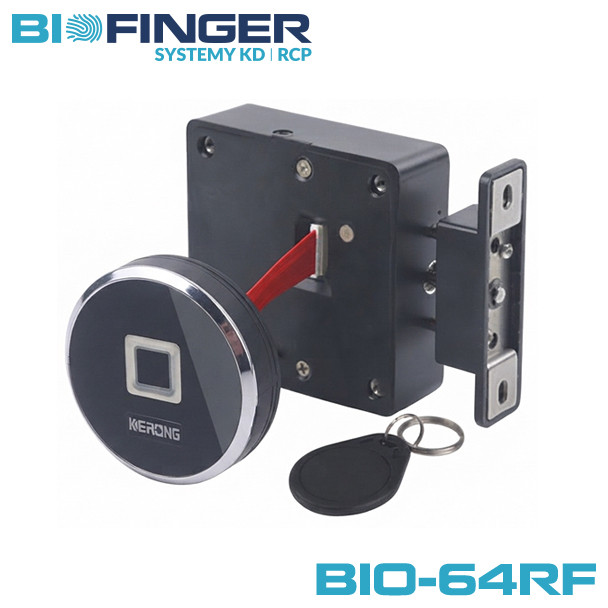
The BIO-64RF-Panel electronic biometric cabinet lock combines the proven internal BIO-S80A lock body with an external round biometric fingerprint reader panel (64RF-Panel). The lock body architecture supports modular expansion across various front interface panels:
Fingerprint & Reader Panels
Compatible with external biometric fingerprint panels (64RF panel Ø64mm, F panel Ø30mm, G panel 65mm, 36SF panel 36mm, 51SF / 51SF-FM panel 51mm).
Touch & Keypad Panels
Compatible with external touch code panels (B panel, C panel, D panel, E panel, 64RP panel, 64RP-FM panel) for dual PIN + Card access.
2. Hardware Overview & Components
Standard Set Contents (Included in Each Package):
-
Electronic Biometric Cabinet Lock Assembly: Lock Body (BIO-S80A) + External Biometric Fingerprint 64RF Panel with ~10 cm connection ribbon cable + Spring-Loaded Strike Latch Bolt (Hook A).
※ Standard factory configuration: pre-programmed to operate in Private Mode out-of-the-box. - Complete Fasteners Set: Precision hardened mounting screws for wood/metal cabinetry and door thickness.
2.1 Lock Body Specification (BIO-S80A)
Material: High-impact ABS polymer housing.
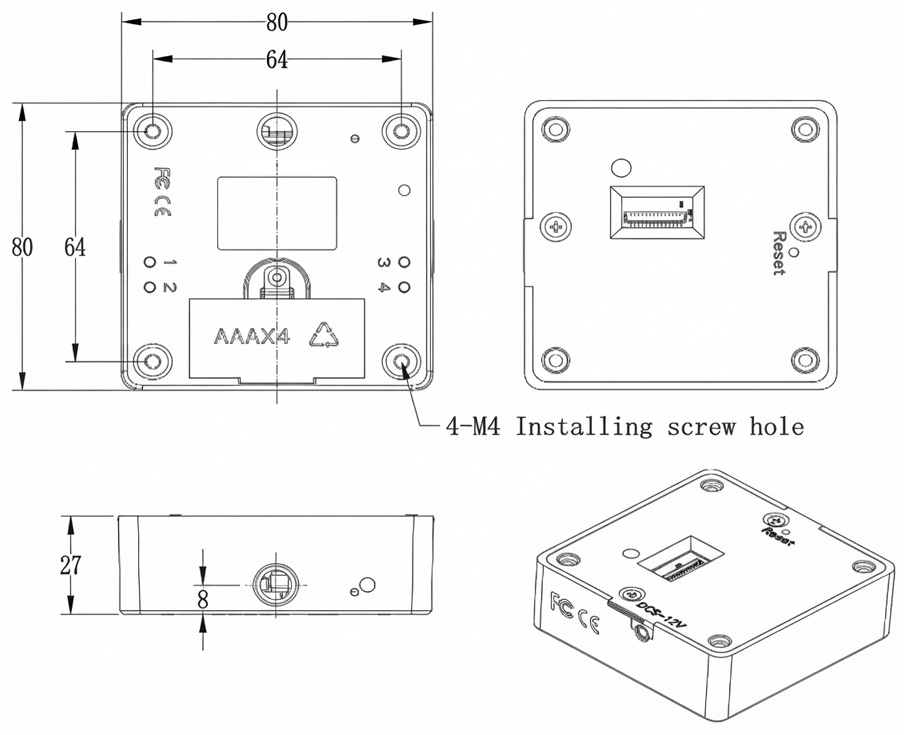
Dimensions: 80 × 80 × 27 mm.
2.2 External Biometric 64RF Panel & Ribbon Cable
Material: Polycarbonate + Acrylic (PC + Acrylic) glossy finish with aesthetic silver frame.
Dimensions: Ø 64 mm × 15.3 mm.
Connection Ribbon Cable: Integrated multi-wire flat cable, length: approx. 10 cm. Connects the external biometric sensor directly to the internal lock body motherboard socket.
2.3 Spring-Loaded Strike Latch Bolt (Hook A, D, E)
Precision-engineered strike hooks designed to accommodate various cabinetry architectures:
- Spring-Loaded Strike Latch Bolt (Hook A): Universal 3D strike latch bolt suitable for both vertical and horizontal installation (standard included in the kit).
- Hook D and Hook E: Specialized strike latches engineered for horizontal installations.
2.4 Fasteners & Screws Specification
Hardened installation screws provided for diverse cabinet substrates (hardwood, MDF, MFC, metal) and door thicknesses.
2.5 External Emergency Power Supply
Equipped with an external emergency micro-USB power input port on the front panel and battery interface on the lock body. Compatible with standard power banks, external battery boxes, or 6V power adapters to supply temporary power if internal batteries are completely exhausted.
To guarantee reliable motorized latch operation and capacitive biometric sensor accuracy, only and exclusively install brand-new, fresh alkaline batteries from a professional manufacturer – INDUSTRIAL Grade (e.g., Varta Industrial Pro, Duracell Procell / Industrial, Energizer Industrial).
STRICTLY PROHIBITED:
• NO rechargeable NiMH batteries (1.2V): 4× 1.2V = 4.8V, which triggers false low-voltage warnings immediately.
• NO zinc-carbon consumer batteries: Inadequate peak discharge current for motor actuation.
• NO mixing old and new cells: Replace all 4 batteries simultaneously.
3. Product Installation Dimensions
Lock Body Dimensions (BIO-S80A)
- Outer dimensions: 80 mm × 80 mm × 27 mm.
- Mounting screw holes: 4 × M4 holes arranged in a 64 mm × 64 mm square pitch.
- Edge margin: 8 mm from hole centers to outer casing edge.
External 64RF Panel Dimensions
- Outer dimensions: Ø 64 mm × 15.3 mm.
- Mounting screw holes: 4 × Ø3.2 mm holes (pitch 34.56 mm × 31.11 mm).
- Ribbon cable: approx. 10 cm connecting cable.
Hook A Dimensions (Standard)
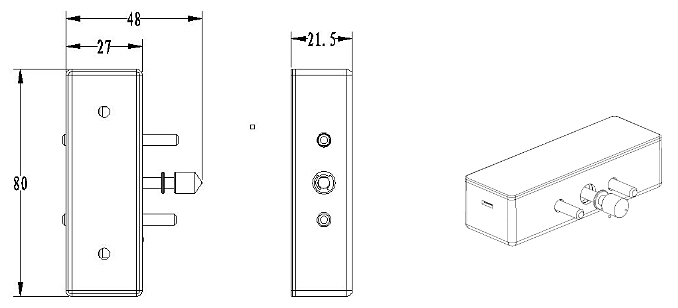
- Outer dimensions: 80 mm (L) × 27 mm (W) × 21.5 mm (H) (10 mm base).
- Mounting screw holes: 2 × Ø4 mm holes with 50 mm pitch.
Hook D & Hook E Dimensions
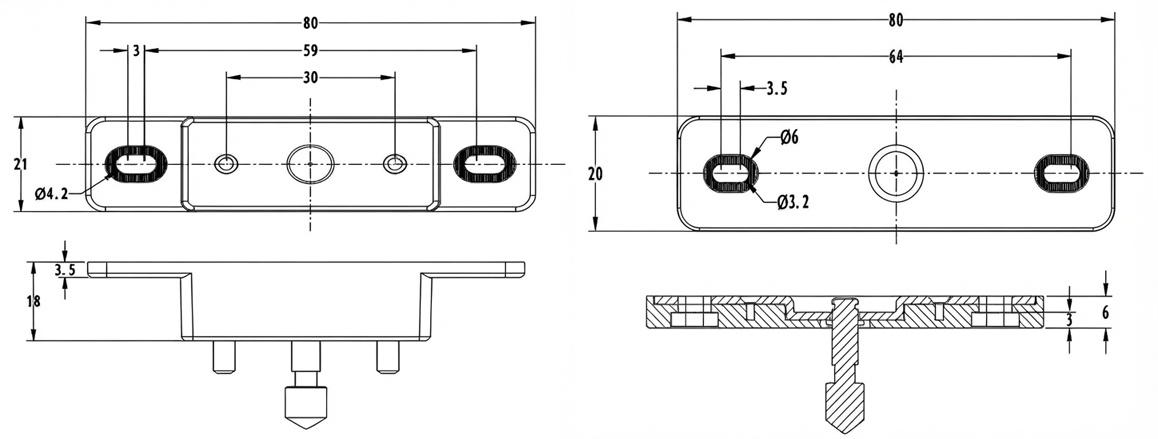
- Hook E: 80 × 21 × 18 mm (pitch 59 mm / 30 mm).
- Hook D: 80 × 20 × 6 mm (pitch 64 mm).
4. Installation Drawings & Assembly
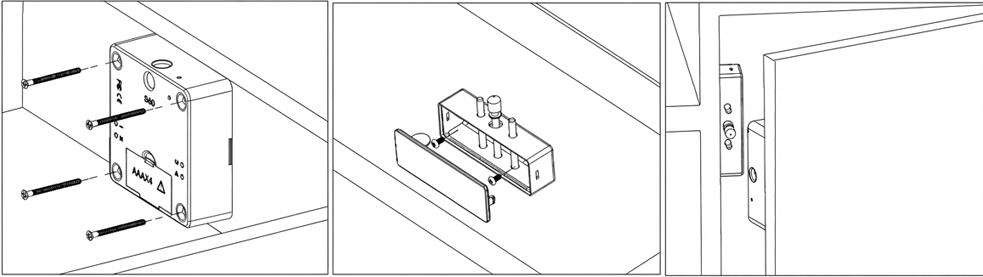
Assembly Procedure: Drill the through-hole in the cabinet door for the ~10 cm ribbon cable and the mounting screws. Connect the ribbon cable firmly to the lock body socket. Mount the external biometric 64RF panel flush on the front door face, and affix the internal lock body (BIO-S80A) to the interior partition. Ensure the spring-loaded strike latch bolt (Hook A) aligns smoothly with the lock latch slot.
5. Operational Parameters & Master Matrix
5.1 Technical Parameters
| Housing Construction | High-impact ABS for lock body shell; Acrylic & Polycarbonate (PC) for external 64RF biometric panel |
| Current Consumption | Static standby consumption: < 100 μA Dynamic motorized operation: < 200 mA |
| Operating Voltage & Battery Lifetime |
DC 6V (4 × AAA 1.5V Alkaline INDUSTRIAL Grade) Estimated operational battery life: 8–10 months. Standby capacity: up to 1 year. |
| Environmental Tolerance | Operating temperature: -15°C to +65°C Operating humidity: 10% to 90% RH (non-condensing) |
| Electrostatic Protection (ESD) | Air static discharge: 15 kV | Direct contact discharge: 8 kV |
5.2 Master Alarm & Notification Signal Matrix
Visual and acoustic alerts are rendered directly on the biometric sensor indicator and internal sounder:
| Status / Trigger Event | Optical (64RF LED) | Acoustic (Buzzer) | System State & Required Action |
|---|---|---|---|
| Standby State | White Light | Silent | Biometric sensor ready for finger placement. |
| Valid Finger Placed | Green (1× flash) | 1× short di | Authorized unlock. Motorized latch bolt retracts. |
| Invalid Finger Placed | Red (2× flashes) | 2× short di di | Access denied. Unregistered biometric print. |
| Low Voltage Warning (< 4.5V) | Blue (steady flash) | Double beep di di on each unlock | LOW BATTERY ALERT (< 4.5V): Acoustic & visual alert on every unlock. Functional for ~1,000 cycles, replace batteries immediately. |
| Critical Voltage Failsafe (< 4.0V) | Blue (continuous) | Periodic warning tone | ANTI-LOCKOUT FAILSAFE: Below 4.0V, the latch bolt PREVENTS RE-LOCKING until batteries are replaced. |
| Door Left Open Alarm (> 30s) | Off | Continuous warning for 10s | Cabinet Door Ajar Alert: Sounds in Private Mode if open for > 30s. Toggle with buttons 1+2. |
| Anti-Tamper Lockout (5× wrong attempts) | Red (continuous) | 5× rapid beeps di di di di di | 5-MINUTE LOCKOUT: Reader disabled for 5 minutes. Place Manager finger to override instantly. |
| Factory Reset Completed | Green (2× flashes) | Triple beep di di di | Memory wiped. Restores factory defaults: Public Mode, all fingerprints erased. |
5.3 Biometric Credential Hierarchy
The BIO-64RF-Panel operates on a secure 2-tier biometric authorization architecture:
| Credential | Enrollment Method | Functional Role & Access Privileges | Capacity |
|---|---|---|---|
| Manager Fingerprint | Button 1 on lock body (1s) | Administrative authority, user enrollment authorization, security lockout override, emergency unlocking. | 1 Fingerprint |
| User Fingerprints | Button 1 + Manager Auth | Daily operational unlocking credentials for authorized users. | Up to 100 Prints |
Hardware Buttons on Lock Body Motherboard (BIO-S80A):
- Button 1: Initiates enrollment of Manager Fingerprint and User Fingerprints.
- Button 2: Initiates deletion of all User Fingerprints.
- Button 3: Cycles operational modes (Public → Private → Limited Public).
- Button 4: Toggles Single Key Mode or Double Key Mode.
- Reset Button: Restores factory default settings.
6. Operations & Mode Configuration
6.1.1 Mode Overview: The lock remains latched by default. Placing an enrolled User finger on the sensor unlocks the cabinet. The latch bolt automatically extends after 5 seconds, allowing the door to be pushed shut and latched securely.
6.1.2 Set Lock into Private Mode:
🛡️ 6.1.3 Enroll Manager Fingerprint
The Manager Fingerprint is the administrative root key used to authorize new user registrations and perform emergency overrides.
🔑 6.1.4 Enroll User Fingerprints (Up to 100 Biometric Templates)
User fingerprints are the daily operational credentials used to unlock the cabinet.
We strongly advise registering a minimum of 4 distinct fingers per user (e.g., 2 fingers from the left hand and 2 fingers from the right hand). This ensures instant, guaranteed access under all daily conditions.
Routine Access Workflow:
6.1.5 Delete User Fingerprints:
Notice: After execution, all user fingerprints are invalid and must be re-registered. Manager Fingerprint remains intact.
6.2.1 Mode Overview: The lock remains unlatched when vacant. Any guest can place their finger 3 times on the sensor to lock the locker, and place that identical finger once to unlock. Once unlocked, the locker is instantly released for the next user.
6.2.2 Set Lock into Public Mode:
🛡️ 6.2.3 Enroll Manager Fingerprint (Emergency Master Access)
In Public Mode, the Manager Fingerprint serves as an emergency master override allowing facility staff to unlock an occupied locker if a guest is unavailable.
🔑 6.2.4 Guest Operation Workflow (No Pre-Enrollment Needed)
To Lock Locker: Place any finger on sensor 3 times → prompts with di, di di, di di di → latch bolt extends → push door closed.
To Unlock Locker: Place that identical finger 1 time → prompts with di → locker unlocks and is freed for the next user.
6.2.5 Delete User Fingerprint (Master Override): Press Button “2” for 1s → place Manager finger → prompts with di di. Frees the occupied locker immediately.
6.3.1 Mode Overview: The lock begins in a locked state. Placing an authorized User finger on the sensor unlocks the cabinet, which remains continuously unlocked for repeated access. Placing the User finger again re-locks the cabinet.
6.3.2 Set Lock into Limited Public Mode:
🛡️ 6.3.3 Set Manager Fingerprint
Press Button “1” for 1s → place finger 3 times sequentially (di, di di, di di di) → Manager Fingerprint registered.
🔑 6.3.4 Set User Fingerprint & Operation
Enrollment: Press Button “1” for 1s → place Manager finger → place user finger 3 times.
Operation: Place User finger → unlocks → cabinet stays continuously unlocked → place User finger again → bolt extends → push door closed.
6.3.5 Delete User Fingerprint: Press Button “2” for 1s → place Manager finger → prompts di di.
7. Reset Lock (Restore Factory Defaults)
The lock can be restored to factory default settings via the hardware reset button located on the lock body motherboard:
Upon completing a reset:
- ALL registered Manager and User Fingerprints are permanently erased from non-volatile memory.
- The lock automatically reverts to default Public Mode (unlatched state).
- If you intend to use Private Mode, you must re-configure the working mode via Button 3 and enroll credentials again.
8. Essential Operational Guidelines & Best Practices
- When the indicator light flashes in blue, batteries are low. Replace with fresh INDUSTRIAL alkaline AAA batteries immediately.
- One lock supports exactly 1 Manager Fingerprint and up to 100 User Fingerprints.
- Biometric Best Practice: Always register a minimum of 4 fingers per authorized person (2 from the left hand and 2 from the right hand) to ensure uninterrupted access.
- Ensure the approx. 10 cm ribbon cable is seated securely in the motherboard header before closing cabinetry.
- Mode Switching Memory Rule: Changing mode from Private Mode to Limited Public Mode preserves all registered fingerprints. However, switching from Limited Public Mode to Public Mode clears user fingerprint memory.
- Verify all biometric enrollments and latch actuations at least 3 times with the cabinet door OPEN before closing and latching the furniture!