


BIO-S123A
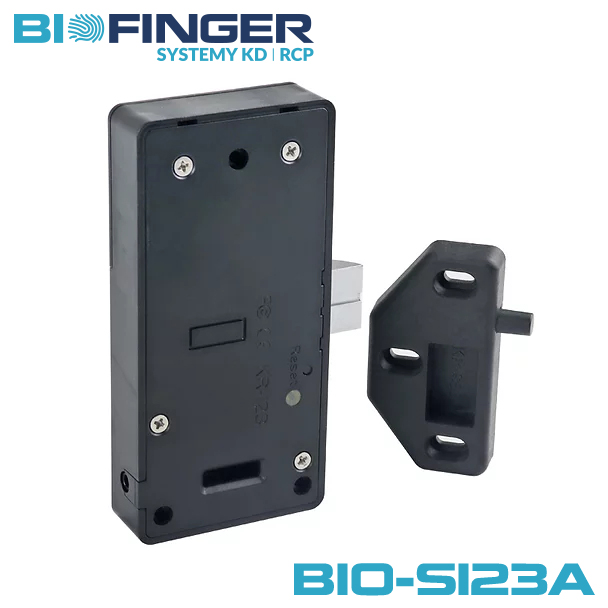
- Install brand-new professional batteries: Use exclusively brand-new 1.5V AAA alkaline batteries of INDUSTRIAL grade (e.g., Varta Industrial Pro, Duracell Procell / Industrial). Never mix used cells or use rechargeable batteries.
- Program and test all credentials prior to mounting: The BIO-S123A features a motorized deadbolt latch tongue on the lock body and an integrated spring-loaded door ejector pin on the strike. Please ensure that the lock operates properly, and that all cards (Manager Card and User Cards) are configured, tested, and verified at least 3 times on an open cabinet door before physically securing the lock body and closing the furniture!
- Understand the Reset consequences before pressing RESET: Before pressing the Reset button on the lock body, carefully read Section 7 to understand the factory reset behavior (all cards will be deleted and the lock restores its factory default Public Mode)!
Table of Contents
-
6. Operations & Mode Configuration
- 6.1 Private Mode (Home, Office, Assigned Lockers)
- • Registering New Manager Card Manager
- • Registering New User Card(s) (Up to 30) User
- • Registering Delete Card (Batch Clear)
- 6.2 Public Mode (Gyms, Spa, Shared Lockers)
- • Registering New Manager Card Manager
- • Registering New User Card User
- • Registering Delete Card (Clear Locker)
- 6.3 Limited Public Mode (Daytime Open)
- • Registering New Manager Card Manager
- • Registering New User Card User
- • Registering Delete Card
- 7. Reset Lock (Restore Factory Defaults / Public Mode)
- 8. Essential Operational Guidelines & Best Practices
1. Relative Products & Modular Accessories
The BIO-S123A lock body features an elongated, slim vertical form factor engineered specifically for concealed installation in narrow stiles, cabinet vertical partitions, locker frames, and slim furniture components where square locks cannot be accommodated. In addition, the lock body features an integrated expansion socket compatible with optional external wired accessory panels:
Touch & Keypad Panels
Compatible with external touch code panels (B panel, C panel, D panel, E panel, 64RP panel, 64RP-FM panel) for dual PIN + Card access.
Fingerprint & Reader Panels
Compatible with external biometric fingerprint and proximity sensor panels (F panel Ø30mm, G panel 65mm, 64RF panel Ø64mm, 36SF panel 36mm, 51SF / 51SF-FM panel 51mm).
2. Hardware Overview & Components
Standard Set Contents (Included in Each Package):
-
Electronic RFID Cabinet Lock BIO-S123A: Slim Lock Body with Motorized Latch Tongue + Door Strike with Integrated Spring-Loaded Ejector Pin
※ Standard factory configuration: each RFID cabinet lock is pre-programmed out-of-the-box to operate in Private Mode. -
Two Pre-Configured Proximity RFID Credentials (13.56 MHz Mifare):
- 1× Manager Proximity Card: Dedicated administrative programming key
- 1× User Proximity Card: Operational credential for daily unlocking
- Complete Fasteners Set: Complete set of hardened mounting screws (4 screws for lock body + 3 screws for strike) for quick installation in wooden, MDF, or metal cabinetry.
2.1 Lock Body Specification
Material: High-impact ABS polymer shell.
Dimensions: 123 × 59 × 19.5 mm (slim vertical architecture).
2.2 Motorized Latch Tongue & Spring Ejector Strike
The BIO-S123A employs an advanced two-part locking mechanism designed to provide smooth electronic latching and automatic door release:
- Motorized Latch Tongue (Lock Body): A solid, motorized deadbolt latch tongue that extends directly from the lock casing into the strike. When an authorized Mifare RFID credential is presented, the internal motor smoothly retracts the tongue into the body to release the door.
- Strike Hook with Integrated Spring Door Ejector (Door Mount): Mounted directly on the door using 3 screws. The strike features an integrated spring-loaded plunger pin (Ø4 mm). When the door is closed, this pin is depressed against the cabinet wall; when the lock tongue retracts, the spring pin automatically pops the door open (1–2 cm) for effortless access without requiring external handles.
2.3 Proximity Credentials (Cards, Fobs, Bands)
Diverse form factors of 13.56 MHz Mifare RFID credentials supported: waterproof silicone wristbands, robust ABS key fobs (teardrop/oval), ISO rectangular cards, and adhesive tokens.
2.4 Fasteners & Screws Specification
Corrosion-resistant, hardened installation screws provided for diverse cabinet substrates: 4× screws for securing the lock body firmly to the cabinet partition and 3× screws for securing the strike hook to the door front.
2.5 External Power Interface & 6V USB-C Power Supply
Equipped with an integrated emergency backup port. Compatible with external battery boxes and emergency power adaptors to supply temporary 6V power if internal batteries are completely exhausted.
Optional Continuous Power Supply: In addition to standard battery operation, every BIO-S123A invisible cabinet lock can be continuously powered via an optional external 6VDC switching power supply with a 1m USB Type-C cable (available separately as an accessory).
* Note: The external 6V USB-C switching power supply is not included in the standard set.
To guarantee 100% operational reliability and prevent electronic latch failure through 25mm timber panels, only and exclusively install brand-new, fresh alkaline batteries from a professional manufacturer – INDUSTRIAL Grade (e.g., Varta Industrial Pro, Duracell Procell / Industrial, Energizer Industrial).
STRICTLY PROHIBITED:
• NO rechargeable NiMH batteries (1.2V): Total voltage of 4× 1.2V is only 4.8V, which immediately triggers premature low-voltage alarms.
• NO zinc-carbon or low-cost supermarket consumer batteries: They lack the high peak discharge current (up to 200mA) required to reliably actuate the motorized latch tongue.
• NO mixing of old and new batteries: Always replace all 4 batteries simultaneously with fresh cells from the same production batch.
3. Product Installation Dimensions
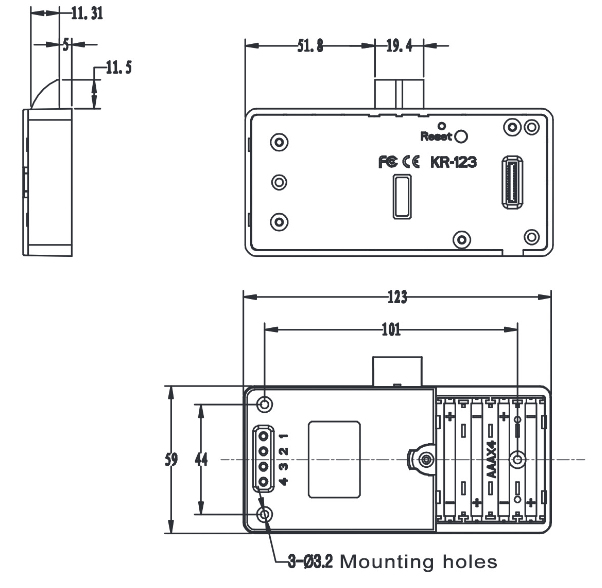
Lock Body Dimensions (4-Hole Mounting)
- Outer dimensions: 123 mm (L) × 59 mm (W) × 19.5 mm (H).
- Mounting screw holes: 4 corner mounting holes arranged for ultra-rigid fastening to the cabinet partition.
- Motorized latch tongue extension: 11.5 mm projection beyond the casing edge.
Strike Dimensions (3-Hole Mounting with Spring Ejector)
- Outer dimensions: 71 mm (L) × 38 mm (W) × 11.5 mm (H) (5.75 mm base step).
- Mounting screw holes: 3 mounting holes (2 slotted holes with 53 mm center-to-center pitch + 1 bottom center hole).
- Integrated door ejector: Ø4 mm spring-loaded plunger pin projecting from the strike shoulder.
4. Installation Drawings & Assembly
The slim lock body mounts flush against the internal cabinet partition wall, shelf, or vertical divider using 4× hardened screws. The door strike mounts onto the inner face of the opening door using 3× screws. When the door is closed, the spring-loaded ejector pin presses against the cabinet frame, and the motorized latch tongue engages smoothly into the strike cavity. When unlocked, the motorized tongue retracts, and the spring pin automatically pops the door open.
5. Operational Parameters & Master Matrix
5.1 Technical Parameters
| Housing Construction | High-impact ABS for lock body shell; Acrylic & PC for optional panels |
| Current Consumption | Static standby consumption: < 100 μA Dynamic motorized operation: < 200 mA |
| Operating Voltage & Battery Lifetime |
DC 6V (4 × AAA 1.5V Alkaline INDUSTRIAL Grade) Estimated operational battery life: 6–12 months (depending on daily usage frequency and battery quality). Continuous power optional: 6VDC switching power supply with 1m USB-C cable. |
| Environmental Tolerance | Operating temperature: -15°C to +65°C Operating humidity: 10% to 90% RH (non-condensing) |
| Electrostatic Protection (ESD) | Air discharge: 15 kV | Direct contact discharge: 8 kV |
5.2 Master Alarm & Notification Signal Matrix
The BIO-S123A integrates an intelligent microcontroller, an acoustic sounder, and a multi-state LED indicator to communicate system statuses, security lockdowns, and battery thresholds:
| Status / Trigger Event | Optical (LED) | Acoustic (Buzzer) | System State & Required Action |
|---|---|---|---|
| Valid Card Presented | Green (1× flash) | 1× short di | Authorized unlock. Motorized latch tongue retracts smoothly; door pops open via spring ejector. |
| Unauthorized Card | Red (2× flashes) | 2× short di di | Access denied. Credential is not registered in system memory. |
| Low Voltage Warning (< 4.5V) | Blue (steady flash) | Double beep di di on each unlock | LOW BATTERY ALERT (< 4.5V): Acoustic & visual alert on every unlock. Lock remains functional for ~1,000 cycles, but fresh INDUSTRIAL AAA batteries must be installed immediately. |
| Critical Voltage Failsafe (< 4.0V) | Blue (continuous) | Periodic warning tone | ANTI-ENTRAPMENT FAILSAFE: Below 4.0V, the latch tongue retracts and PREVENTS RE-LOCKING until batteries are replaced. Eliminates locked-out cabinets. |
| Door Left Open Warning (Door Ajar Alert) (> 30s) | Off | Continuous alert for 10 seconds | Cabinet Door Left Open Alarm: Sounds in Private Mode if the cabinet door remains unlatched/open for over 30 seconds. Toggle with Button 1 + 2. |
| Anti-Tamper Lockout (5× wrong attempts) | Red (continuous) | 5× rapid beeps di di di di di | SECURITY LOCKDOWN: 5 consecutive invalid presentations disable the reader for 5 minutes. Present Manager Card to override immediately. |
| Factory Reset Executed | Green (2× flashes) | Triple beep di di di | All memory cleared. Lock restores factory default Public Mode (unlatched state). |
5.3 Mode-Dependent Credential Roles Matrix
Important Operational Principle: The functional behavior, access privileges, and unlocking logic of each RFID credential depend strictly on the active operational mode (Private, Public, or Limited Public Mode) configured on the lock:
| Credential Type | Private Mode (Sec. 6.1) | Public Mode (Sec. 6.2) | Limited Public Mode (Sec. 6.3) | Capacity |
|---|---|---|---|---|
|
Manager Card (Administrative Master) |
Programming Only Authorizes enrollment of User Cards. Does not unlock cabinet directly. |
Emergency Master Key Allows facility staff to immediately unlock and override an occupied locker. |
Programming Only Authorizes enrollment of User Cards and replacement credentials. |
Up to 10 cards |
|
User Card (Daily Operational Key) |
Routine Access Pre-enrolled cards. Retracts latch tongue; automatically re-extends after 5 seconds. |
Dynamic Guest Key Any guest Mifare card locks the door and becomes the sole key to unlock. |
Daytime Latch Pre-enrolled cards. Retracts tongue (stays open); present again to extend and re-lock. |
Up to 30 cards (Dynamic in Public) |
|
Delete Card (Memory Clearing Key) |
Batch Clear Single presentation permanently revokes all 30 enrolled User Cards. |
Locker Release Single presentation clears current occupant's card, freeing locker for next guest. |
Batch Clear Single presentation revokes all enrolled User Cards simultaneously. |
Up to 10 cards |
|
Master Card (Hardware Override) |
Universal Emergency Override: Hardware-level emergency unlock credential across installations. | 1 per installation | ||
Integrated Button Functions on Lock Body:
- Button 1: Enrolls Manager Cards and User Cards.
- Button 2: Enrolls Delete Cards.
- Button 3: Cycles working modes (Private → Public → Limited Public).
- Button 4: Toggles Single Key Mode or Double Key Mode (two credentials required).
- Reset Button: Reverts the lock to factory default settings.
6. Operations & Mode Configuration
Operating Modes Comparison – BIO-S123A
The BIO-S123A slim electronic furniture lock can operate in one of three dedicated modes. The table below outlines key functional differences, motorized latch tongue behaviors, and credential requirements:
| Feature / Parameter | Private Mode | Public Mode | Limited Public Mode |
|---|---|---|---|
| Factory Configuration | ★ FACTORY DEFAULT Pre-configured to Private Mode by default. | Optional Switched via Button 3. | Optional Switched via Button 3. |
| Default Rest State | Locked (Closed) | Unlocked (Open) | Locked (Closed) |
| User Card Programming | Required (up to 30 enrolled cards stored in memory). | Not required (accepts any compatible Mifare card on locking). | Required (up to 30 enrolled cards stored in memory). |
| Unlocking Procedure | Present enrolled card to retract latch tongue (re-extends after 5s). | Present the registered session card to retract latch tongue and clear memory. | Present enrolled card to retract latch tongue — stays permanently retracted. |
| Locking Procedure | Push door closed (spring-loaded ejector pin compresses, tongue locks). | Push door closed + present card to extend latch tongue and lock. | Push door closed + re-present card to extend tongue and lock at end of shift/session. |
| Typical Applications | Slim lockers, office pedestals, personal filing drawers, narrow cabinet doors. | Gyms, fitness clubs, swimming pools, spas, shared day lockers. | Shared tool cribs, departmental archives accessed frequently during work hours. |
6.1.1 Mode Overview: The lock remains latched under Private Mode. Only enrolled User Cards can unlock the cabinet. Upon swiping a valid card, the motorized latch tongue retracts into the casing, the spring ejector pushes the door open, and the tongue automatically re-extends after 5 seconds, allowing the door to be pushed shut securely into the strike plate.
6.1.2 Set Lock into Private Mode:
🛡️ 6.1.3 Registering New Manager Card (Programming Authority)
In Private Mode, the Manager Card is used strictly to authorize the enrollment of new User Cards.
🔑 6.1.4 Registering New User Card(s) (Up to 30 User Credentials)
User Cards are the daily credentials used to unlock the cabinet.
6.1.5 How to Use User Card:
6.1.6 Registering Delete Card (Batch Clear All Users):
Presenting the Delete Card immediately revokes all 30 registered User Cards simultaneously.
6.2.1 Mode Overview: The latch tongue remains retracted inside the casing under Public Mode. Any customer can access a free locker. Presenting any Mifare credential extends the motorized latch tongue into the strike plate to lock the door, and only that identical credential will retract it to unlock. Once unlocked, the locker is instantly released for the next guest.
6.2.2 Set Lock into Public Mode:
🛡️ 6.2.3 Registering New Manager Card (Emergency Master Key)
In Public Mode, the Manager Card acts as an emergency master override allowing facility staff to unlock the locker if a guest misplaces their credential.
🔑 6.2.4 Registering New User Card (Automatic Guest Locking)
No pre-enrollment required! Under Public Mode, any unregistered Mifare card or wristband presented by a guest will automatically drive the motorized latch tongue into the strike plate to lock the door. That exact same credential is then required to retract the tongue and unlock it.
6.2.5 How to Use (Locking & Unlocking Workflow):
6.2.6 Registering Delete Card (Clear Current Locker):
Presenting the Delete Card immediately frees the locker by clearing the active guest card's assignment.
6.3.1 Mode Overview: The lock begins in a locked state. Once unlocked by an authorized user card, the motorized latch tongue remains continuously retracted throughout the working day. When the employee is ready to lock up, they push the door shut and present their user card again to extend the latch tongue into the strike plate.
6.3.2 Set Lock into Limited Public Mode:
🛡️ 6.3.3 Registering New Manager Card
🔑 6.3.4 Registering New User Card
6.3.5 How to Use User Card:
6.3.6 Registering Delete Card: Press Button “2” for 2s → present card → prompts “di”. Presentation clears user memory.
7. Reset Lock (Restore Factory Defaults / Public Mode)
When the Reset button is pressed and held for 2 seconds:
- ALL CREDENTIALS ARE PERMANENTLY DELETED: Every registered User Card, Manager Card, and Delete Card is erased from internal non-volatile memory. All previously programmed cards become completely invalid.
- LOCK RESTORES FACTORY DEFAULT PUBLIC MODE: The invisible RFID lock immediately restores its standard factory state (Public Mode – default tongue retracted state). If you wish to use the lock in Private Mode, you must explicitly program it into Private Mode as outlined in Section 6.1.2 before registering daily user credentials.
8. Essential Operational Guidelines & Best Practices
- When the indicator light flashes in blue, it indicates battery capacity is critically low. Replace with fresh INDUSTRIAL alkaline batteries immediately.
- System memory capacity per lock: 10 pcs Manager Cards, 10 pcs Delete Cards, and 30 pcs User Cards.
- Always install brand-new, premium professional batteries of the INDUSTRIAL grade (e.g. Varta Industrial Pro, Duracell Procell). Expected battery lifetime: 6–12 months. Never mix old and new cells.
- Verify full lock actuation, ensure battery installation, and enroll all credentials BEFORE physically mounting the lock into the furniture!
- Automatic Door Ejection: The BIO-S123A door strike features an integrated spring-loaded ejector pin (Ø4 mm) that automatically pushes the door open (1–2 cm) as soon as the motorized latch tongue retracts. Ensure that the strike is mounted with its 3 screws firmly secured and aligned so the ejector pin depresses smoothly without snagging.